
FlutterArtist Debug Filter Model Inspector
Debug Filter Model Inspector is a tool that allows you to inspect the state and data of a FilterModel. This tool can be opened via a button on the FilterControlBar or programmatically via code.
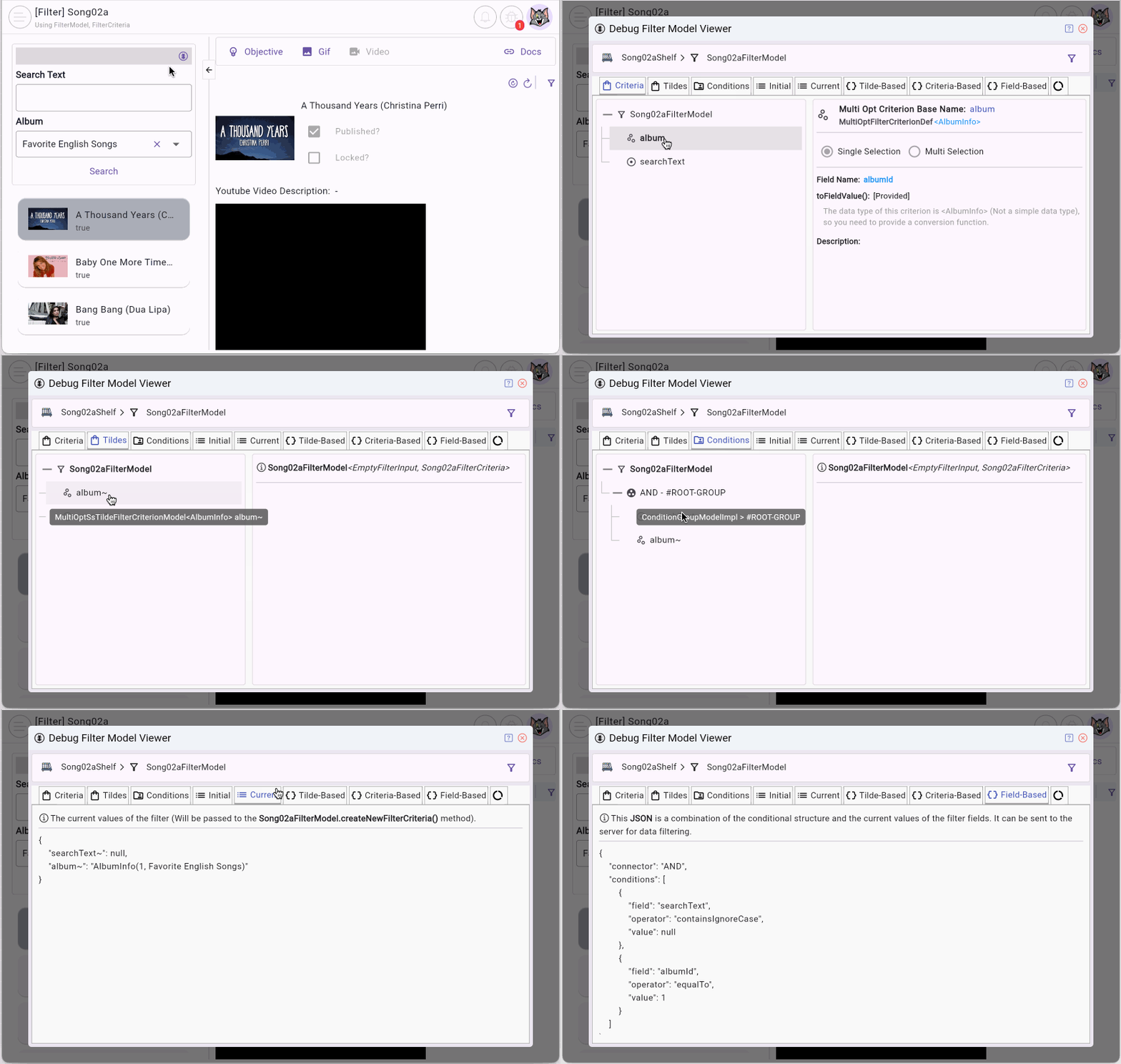
Open the Debug Filter Model Inspector using the code:
FilterModel filterModel = ...;

filterModel.showDebugFilterModelInspector();1. FilterModel
First, let’s look at a simple FilterModel with two defined criteria.
product77a_filter_model.dart (*)
...
@override
FilterModelStructure defineFilterModelStructure() {
  return FilterModelStructure(
    criteriaStructure: FilterCriteriaStructure(
      simpleCriterionDefs: [
        SimpleFilterCriterionDef<double>(criterionBaseName: "price"),
      ],
      multiOptCriterionDefs: [
        // Multi Options Single Selection Criterion.
        MultiOptFilterCriterionDef<CategoryInfo>.singleSelection(
          criterionBaseName: "category",
          fieldName: 'categoryId',
          toFieldValue: (CategoryInfo? rawValue) {
            return SimpleVal.ofInt(rawValue?.id);
          },
        ),
      ],
    ),
    conditionStructure: FilterConditionStructure(
      connector: FilterConnector.and,
      conditionDefs: [
        FilterConditionDef.simple(
          tildeCriterionName: "category~",
          operator: FilterOperator. equalTo,
        ),
        FilterConditionDef.simple(
          tildeCriterionName: "price~min",
          operator: FilterOperator.equalTo,
        ),
        FilterConditionDef.simple(
          tildeCriterionName: "price~max",
          operator: FilterOperator.equalTo,
        ),
      ],
    ),
  );
}
Criteria
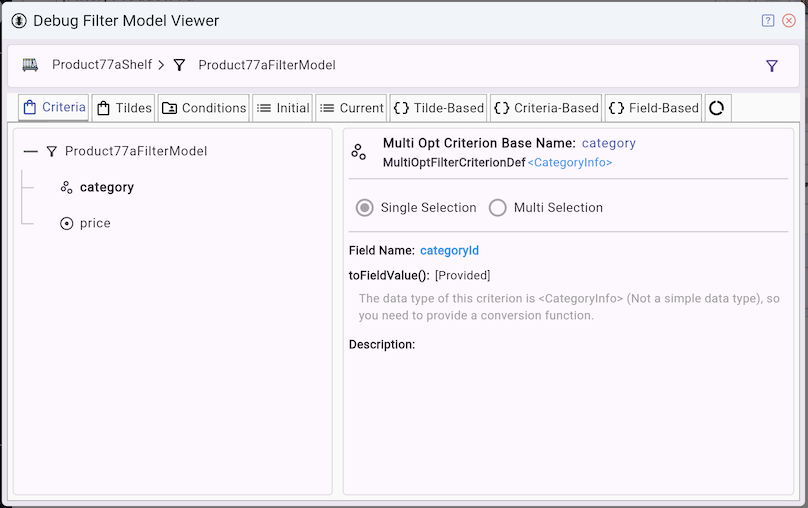
On the Debug Filter Model Inspector, you can view the data type definitions of these criteria.
tildeCriterionName
In FlutterArtist, a tildeCriterionName is a special identifier representing a filtering condition. A single criterion can have one or multiple tildeCriterionName(s). Each tildeCriterionName maps 1-to-1 to an input field on the FilterPanel.
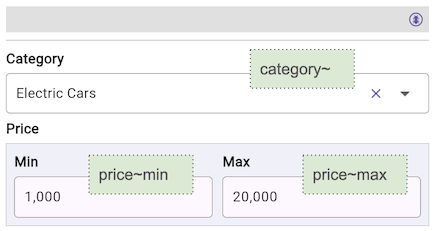
A tildeCriterionName always contains the "~" character. For example, like this:
- category~
- price~min
- price~max
tildeCriterionName = criterionBaseName + suffixOn the UI (FilterPanel), users input or select values corresponding to each tildeCriterionName.
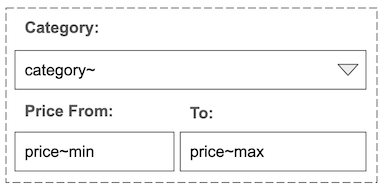
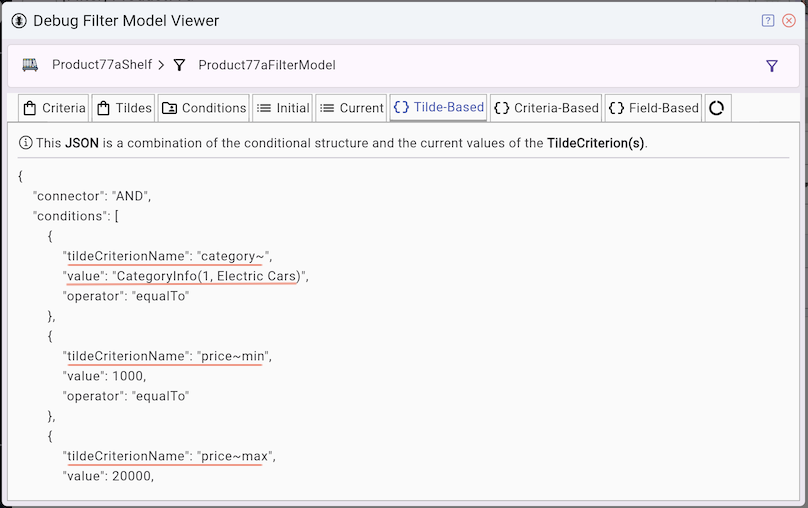
- Tilde-Based JSON is a conditional structure that accurately records what the user sees on the interface. Each TildeFilterCriterion corresponds to an input field on the interface.
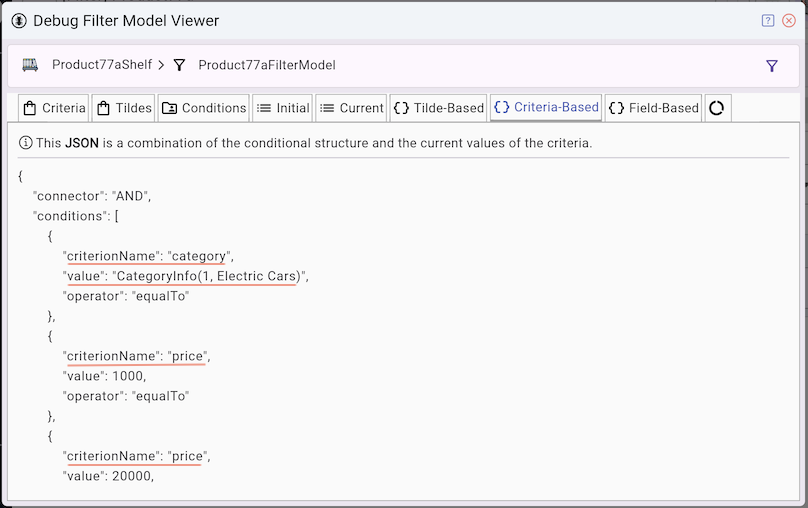
- Criteria-Based JSON is a simplified conditional structure of Tilde-Based JSON where tildeCriterionName(s) are replaced by criterionName(s) and their logical values.
Tilde-Based JSON | Criteria-Based JSON |
At the third level, we have Field-Based JSON, which is the final serialization process. This is where the toFieldValue() method is called to convert a complex data type into a simpler data type (int, double, String, bool). Field-Based JSON is the final product sent to the server for data querying and filtering.
Field-Based JSON
{
    "connector": "AND",
    "conditions": [
        {
            "field": "categoryId",
            "operator": "equalTo",
            "value": 1
        },
        {
            "field": "price",
            "operator": "greaterThan",
            "value": 1000
        },
        {
            "field": "price",
            "operator": "lessThan",
            "value": 20000
        }
    ]
}
Tildes
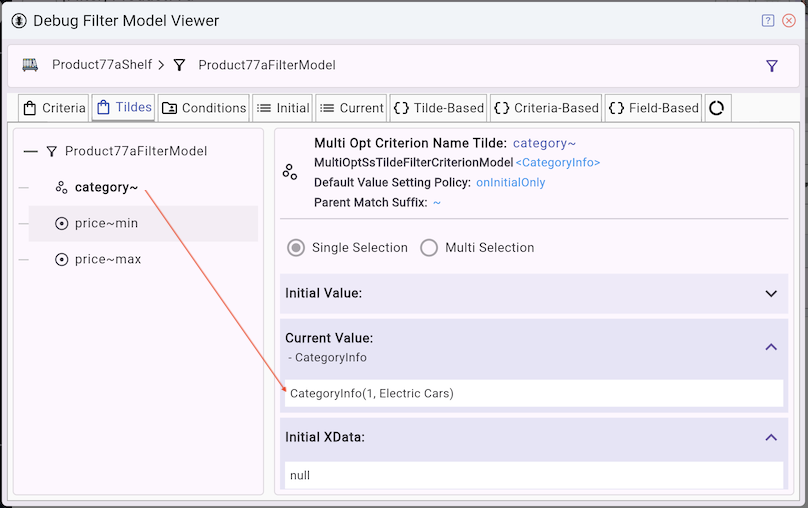
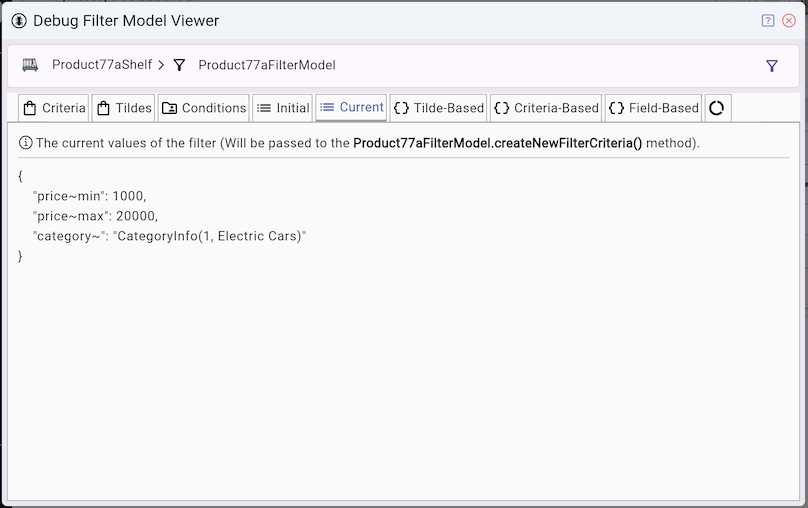
This tab allows you to inspect the current values of all tildeCriterionName(s) These values are passed into FilterModel.createNewFilterCriteria() to construct a new FilterCriteria object.
@override
Song02aFilterCriteria createNewFilterCriteria({
  required Map<String, dynamic> criteriaMap,
}) {
  return Song02aFilterCriteria(
    album: criteriaMap["album~"],
    searchText: criteriaMap["searchText~"],
  );
}
{ } Tilde-Based JSON
This tab displays a JSON result of combining the condition structure and the current data of the TildeCriterion(s).
- This is the representation closest to what the user sees on the UI.
{ } Criteria-Based JSON
This tab displays a JSON result of combining the condition structure, the criterionBaseName(s), and the current data of the TildeCriterion(s).
- This is the logic-level representation, where UI-specific (~) details are removed.
{ } Field-Based JSON
This tab displays a JSON result of combining the conditional structure and field(s) with their current data.
- This is the final representation used for API requests.
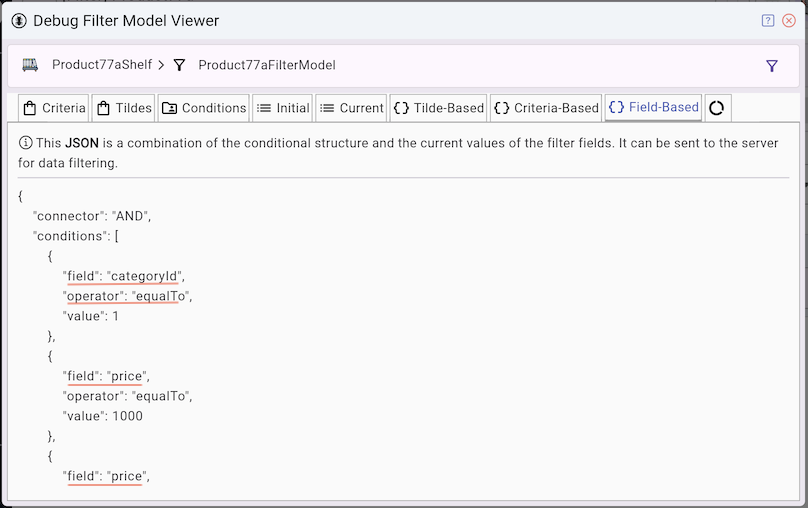
Field-Based JSON is a complete JSON payload that can be sent directly to the server for filtering data. Note: Before querying, a FilterCriteria object is automatically created from the FilterModel, and you can retrieve this JSON from it.
Block.performQuery()
@override
Future<ApiResult<PageData<ProductInfo>?>> performQuery({
  required Object? parentBlockCurrentItem,
  required Product77aFilterCriteria filterCriteria,
  required SortableCriteria sortableCriteria,
  required Pageable pageable,
}) async {
  return await productRestProvider.queryWithFieldBasedJSON(
    pageable: pageable,
    fieldBasedJSON: filterCriteria.fieldBasedJSON,
  );
}
toFieldValue()
Note: The data types of the fields are simple types (String, int, double, bool), so in some cases you need to provide a toFieldValue() conversion function like the one below:
defineFilterModelStructure()
@override
FilterModelStructure defineFilterModelStructure() {
  return FilterModelStructure(
    criteriaStructure: FilterCriteriaStructure(
      simpleCriterionDefs: [
        SimpleFilterCriterionDef<double>(criterionBaseName: "price"),
      ],
      multiOptCriterionDefs: [
        // Multi Options Single Selection Criterion.
        MultiOptFilterCriterionDef<CategoryInfo>.singleSelection(
          criterionBaseName: "category",
          fieldName: 'categoryId',
          toFieldValue: (CategoryInfo? rawValue) { // <---------
            return SimpleVal.ofInt(rawValue?.id);
          },
        ),
      ],
    ),
    ...
  );
}
2. Conclude
Think of FilterModel as a 3-step pipeline:
- Users input values on the UI (FilterPanel) → Each input maps to a tildeCriterionName
- UI values are grouped into logical filtering criteria → UI-specific details (~) are removed
- Criteria are transformed into primitive data for API requests → Uses field + value
Even simpler way to think
- Tilde = what the user sees
- Criteria = what the system understands
- Field = what the server needs
No ADS
FlutterArtist
- FlutterArtist Debug Network Inspector
- Basic concepts in Flutter Artist
- FlutterArtist Block ex1
- FlutterArtist Filter Example
- FlutterArtist FilterModel MultiOptFilterCriterion ex1
- FlutterArtist FilterInput Example 1
- FlutterArtist Form ex1
- The idea of designing filter models in FlutterArtist
- FlutterArtist FormModel.patchFormFields() Ex1
- FlutterArtist BlockQuickItemUpdateAction Example
- FlutterArtist BlockNumberPagination Ex1
- FlutterArtist GridView Infinite Scroll Example
- FlutterArtist BlockQuickMultiItemCreationAction Example
- FlutterArtist ListView Infinite Scroll Pagination Example
- FlutterArtist Pagination
- FlutterArtist Sort DropdownSortPanel Example
- FlutterArtist Dio
- FlutterArtist BlockBackendAction Example
- FlutterArtist BackgroundWebDownloadAction Example
- FlutterArtist StorageBackendAction ex1
- FlutterArtist Block External Shelf Event Example
- FlutterArtist Filter FormBuilderMultiDropDown Ex1
- FlutterArtist Master-detail Blocks ex1
- FlutterArtist Scalar ex1
- FlutterArtist Pagination Davi table Infinite Scroll Ex1
- FlutterArtist Filter Tree FormBuilderField ex1
- FlutterArtist Filter FormBuilderRadioGroup ex1
- FlutterArtist Form Parent-child MultiOptFormProp ex1
- FlutterArtist Manual Sorting ReorderableGridView Example
- FlutterArtist Manual Sorting ReorderableListView
- FlutterArtist Scalar External Shelf Event Example
- FlutterArtist Code Flow Inspector
- FlutterArtist Projections
- FlutterArtist Debug Log Viewer
- FlutterArtist start
- FlutterArtist AppConfiguration
- FlutterArtist Debug App Inspector
- FlutterArtist Debug Filter Criteria Inspector
- FlutterArtist Debug Filter Model Inspector
- FlutterArtist Debug Form Model Inspector
- FlutterArtist DebugMenu
- FlutterArtist Debug UI Context Inspector
- FlutterArtist Debug Shelf Structure Inspector
- FlutterArtist Context Provider Views
- FlutterArtist FilterModelStructure ex1
- FlutterArtist FilterModelStructure ex2
- FlutterArtist FilterModelStructure ex3
- FlutterArtist Internal Shelf Event ex1
- FlutterArtist Deferring External Shelf Events Example
- FlutterArtist Face
- Overview of FlutterArtist Theme
- FlutterArtist Theme Design Tokens Architecture
- FlutterArtist Themes FaColorUtils
- Flutter Artist Theme - Create a custom theme
Show More