
FlutterArtist AppConfiguration
As mentioned in the introduction, FlutterArtist aims to organize the application systematically, much like arranging shelves in a well-structured warehouse. To achieve that orderliness, we need a centralized blueprint called AppConfiguration. This is where you declare the core components: from storage structures (Shelves), business logic (Activities) to technical adapters. Below is an illustrative example of how to set up this configuration class:
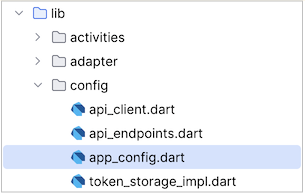
app_config.dart
class MyDemoAppConfiguration extends AppConfiguration {
  @override
  String get appName => "FlutterArtist Demo";

  @override
  List<ProjectionFamily> projectionFamilies() {
    return [
      ProjectionFamily<int>(
        familyName: 'supplier-projections',
        members: {SupplierInfo, SupplierData},
      ),
      ProjectionFamily<int>(
        familyName: 'album-projections',
        members: {AlbumInfo, AlbumData},
      ),
    ];
  }

  @override
  void registerActivities() {
    FlutterArtist.storage.registerActivity(() => AppLoginActivity());
  }

  @override
  void registerShelves() {
    FlutterArtist.storage.registerShelf(() => Currency01aShelf());
    FlutterArtist.storage.registerShelf(() => Song02aShelf());
    // Other codes...
  }

  @override
  List<FaTheme> additionalThemes() {
    return FlutterArtistVibeThemeKit.supportedThemes;
  }

  @override
  void overrideColorResolvers() {
    //
  }

  @override
  Future<void> showDebugNetworkInspector(BuildContext context) async {
    bool isSystemUser = FlutterArtist.loggedInUser?.isSystemUser ?? false;
    await DebugNetworkInspectorDialog.show(
      context,
      showJson: isSystemUser,
      showToken: isSystemUser,
    );
  }

  @override
  FlutterArtistCoreFeaturesAdapter get coreFeaturesAdapter =>
      MaterialFlutterArtistCoreFeaturesAdapter();

  @override
  FlutterArtistGlobalDataAdapter<IGlobalData> get globalDataAdapter =>
      GlobalDataAdapterImpl();

  @override
  Future<void> updateLocale({required Locale locale}) {
     // Logic to update Locale.
  }

  @override
  FlutterArtistLoginLogoutAdapter<ILoggedInUser> get loginLogoutAdapter =>
      LoginLogoutAdapterImpl();

  @override
  FlutterArtistNotificationAdapter? get notificationAdapter {
    // NotificationAdapterImpl
    return MyFirebaseNotificationAdapter();
  }
}
Starting the application is now more explicit through the FlutterArtist.start() method in main.dart.
main.dart (*)
await FlutterArtist.start(
  appConfiguration: MyDemoAppConfiguration(),
  ...
);
No ADS
To support the development process, you can utilize the Debug App Inspector. This tool helps you inspect the actual structure of the AppConfiguration, monitor the status of Shelf(s), and visually check data in real-time while the app is running. This centralized registration model may require initial meticulousness, but it helps maintain a Single Source of Truth. This minimizes data conflict errors and provides better control for large-scale projects. The combination of AppConfiguration's discipline and Debug App Inspector's transparency will make state management simpler and more professional.

- Giới thiệu về FlutterArtist
1. registerShelves()
The registerShelves() method allows you to register Shelf(s). Imagine having shelves that need to be placed in the correct positions within the warehouse before they can be used.
registerShelves()
@override
void registerShelves() {
   FlutterArtist.storage.registerShelf(() => Country61aShelf());
   FlutterArtist.storage.registerShelf(() => FootballPlayer86aShelf());
   FlutterArtist.storage.registerShelf(() => ProjectContributor98aShelf());
}
Anywhere in the application, you can access any shelf by searching for it within the storage.
FootballPlayer86aShelf shelf = FlutterArtist.storage.findShelf();If a Shelf is not registered, a runtime error will occur when you attempt to access it. A bright red error screen will appear to alert you.

2. registerActivities()
The registerActivities() method allows you to register Activity(s) — a data model and controller that simulates specific activities or functions. Essentially, an Activity is designed to handle complex logic that Block and Scalar do not cover, such as AppLoginActivity for authentication.
Note: Currently, the Activity design is in its early stages. Its scope is limited, and significant changes are expected in future versions to optimize its capabilities.
No ADS
registerActivities()
@override
void registerActivities() {
  FlutterArtist.storage.registerActivity(() => AppLoginActivity());
}
Similar to a Shelf, accessing an unregistered Activity will trigger a red screen error.
findActivity()
AppLoginActivity loginActivity = FlutterArtist.storage.findActivity();3. projectionFamilies()
The projectionFamilies() method allows you to define ProjectionFamily(s). This is a core concept that helps manage different data versions of the same entity.
projectionFamilies()
@override
List<ProjectionFamily> projectionFamilies() {
  return [
    ProjectionFamily<int>(
      familyName: 'supplier-projections',
      members: {SupplierInfo, SupplierData},
    ),
    ProjectionFamily<int>(
      familyName: 'album-projections',
      members: {AlbumInfo, AlbumData},
    ),
    ProjectionFamily<int>(
      familyName: 'company-projections',
      members: {CompanyInfo, CompanyData, CompanyTreeItem, CompanyTree},
    ),
    // ...
  ];
}
No ADS
4. coreFeaturesAdapter
FlutterArtist was initially built upon the accessible features provided by GetX, such as Global BuildContext, Overlay, and SnackBar. Among these, the Overlay is a nearly transparent layer covering the entire screen, used to temporarily prevent user interaction with underlying widgets until an asynchronous task is completed.
To eliminate the mandatory dependency on GetX, the FlutterArtistCoreFeaturesAdapter interface was designed as an intermediary abstraction layer. This solution allows FlutterArtist to operate independently, while core features are still guaranteed through optional adapters.
Currently, FlutterArtist is entirely decoupled from GetX by utilizing the flutter_artist_core_features_adapter library to provide all the aforementioned features.
class MyDemoAppConfiguration extends AppConfiguration {

  @override
  FlutterArtistCoreFeaturesAdapter get coreFeaturesAdapter =>
      MaterialFlutterArtistCoreFeaturesAdapter();

  // Other configurations...
}
You simply need to declare the corresponding library in your pubspec.yaml file:
pubspec.yaml (*)
dependencies:
  flutter_artist_core_features_adapter:
If you need to build your own implementation of FlutterArtistCoreFeaturesAdapter, you can refer to the technical documentation at the link below.
- FlutterArtist FlutterArtistCoreFeaturesAdapter
5. updateLocale()
In the Flutter ecosystem, there are numerous libraries supporting multi-language application development, such as GetX, Slang, or easy_localization. Each library has its own way of handling UI language changes. To ensure flexibility, FlutterArtist does not directly interfere with this logic. Instead, you simply need to provide the corresponding update logic within the updateLocale() method of AppConfiguration:
For example, with GetX:
updateLocale (GetX)
class MyDemoAppConfiguration extends AppConfiguration {

  @override
  Future<void> updateLocale({required Locale locale}) async {
     await Get.updateLocale(locale);
  }

  // Other configurations...
}
For example, with Slang:
updateLocale (Slang)
class MyDemoAppConfiguration extends AppConfiguration {

  @override
  Future<void> updateLocale({required Locale locale}) {
     LocaleSettings.setLocaleRaw(locale.languageCode);
  }

  // Other configurations...
}
For example, with easy_localization:
updateLocale (easy_localization)
class MyDemoAppConfiguration extends AppConfiguration {

  @override
  Future<void> updateLocale({required Locale locale}) {
     FlutterArtistCore.context.setLocale(locale);
  }

  // Other configurations...
}
No ADS
Anywhere in the application, you can retrieve the list of supported locales and perform an update as follows:
final currentLocale = FlutterArtist.localeManager.currentLocale;
final List<Locale> supportedLocales = FlutterArtist.localeManager.supportedLocales;

final newLocale = ...;
// Update and save the Locale to the system.
await FlutterArtist.localeManager.updateAndStoreLocale(locale: newLocale);
6. loginLogoutAdapter
The core purpose of FlutterArtistLoginLogoutAdapter is to define the mechanism for converting the ILoggedInUser object into a JSON string and vice versa. This JSON data is persistently stored on the device (Local Storage) by FlutterArtist. Upon subsequent application restarts, this JSON string is read back to restore the user's state.
After restoration, FlutterArtist automatically invokes the performReloadLoggedInUser() method to fetch the latest information from the server. If successful, user data and tokens are updated or renewed. In case of failure or expired tokens, the system will require a fresh login.
FlutterArtistLoginLogoutAdapter
interface class FlutterArtistLoginLogoutAdapter<USER extends ILoggedInUser> {
  ///
  /// If user information was previously stored on a local storage and successfully recovered at application startup,
  /// this method will be automatically invoked to retrieve the latest information from the server.
  ///
  Future<USER> performReloadLoggedInUser({required USER loggedInUser}) async {
    throw UnimplementedError();
  }

  /// Convert the user object to a JSON string for local storage.
  String toJson(USER loggedInUser) {
    throw UnimplementedError();
  }

  /// Restore the user object from a JSON string upon application restart.
  USER? fromJson(String json) {
    throw UnimplementedError();
  }

  ///
  /// Implementation Example (Use with fresh_dio library):
  ///
  /// ```
  /// LoggedInUserData token = loggedInUser as LoggedInUserData;
  /// fresh.setToken(token);
  /// ```
  ///
  void addThirdPartyLogicOnLogin(USER loggedInUser) {
    throw UnimplementedError();
  }

  ///
  /// Implementation Example (Use with fresh_dio library):
  ///
  /// ```
  /// fresh.setToken(null);
  /// ```
  ///
  void addThirdPartyLogicOnLogout() {
    throw UnimplementedError();
  }
}
Additionally, this adapter provides two strategic hooks: addThirdPartyLogicOnLogin and addThirdPartyLogicOnLogout. These allow for clean integration with third-party token management libraries like fresh_dio.
No ADS
Implementation example with fresh_dio:
LoginLogoutAdapterImpl
class LoginLogoutAdapterImpl
    implements FlutterArtistLoginLogoutAdapter<LoggedInUserData> {
  @override
  Future<LoggedInUserData> performReloadLoggedInUser({
    required LoggedInUserData loggedInUser,
  }) async {
    // Logic to reload user info from server...
  }

  @override
  LoggedInUserData? fromJson(String json) {
    Map<String, dynamic> map = jsonDecode(json);
    return LoggedInUserData.fromJson(map);
  }

  @override
  String toJson(LoggedInUserData loggedInUserData) {
    LoggedInUserData data = loggedInUserData as LoggedInUserData;
    Map<String, dynamic> map = data.toJson();
    return jsonEncode(map);
  }

  @override
  void addThirdPartyLogicOnLogin(LoggedInUserData loggedInUser) {
    // LoggedInUserData implements OAuth2Token (fresh_dio):
    LoggedInUserData token = loggedInUser as LoggedInUserData;
    fresh.setToken(token);
  }

  @override
  void addThirdPartyLogicOnLogout() {
    fresh.setToken(null);
  }
}
7. globalDataAdapter
The FlutterArtistGlobalDataAdapter is responsible for loading foundational and shared data for the entire application, such as branch lists, company information, personalized settings, or system categories. This data is highly stable with low volatility but is frequently accessed across multiple screens. GlobalData is triggered to load immediately after a successful login or during the auto-login process.
Similar to user information, GlobalData can be converted into a JSON string for persistent local storage. This stored version acts as a fallback if fetching data from the server fails during startup.
FlutterArtistGlobalDataAdapter
interface class FlutterArtistGlobalDataAdapter<G extends IGlobalData> {
  // Implement data load from the server via ILoggedInUser (containing a token).
  Future<G> performLoadGlobalData({required ILoggedInUser loggedInUser}) async {
    throw UnimplementedError();
  }

  // Convert global data to JSON for local storage.
  String toJson(G globalData) {
    throw UnimplementedError();
  }

  // Recreate global data from a saved JSON string.
  G? fromJson(String json) {
    throw UnimplementedError();
  }
}
Anywhere in the application, you can easily access this shared data source through FlutterArtist:
// Access the current Global Data
final IGlobalData? globalData = FlutterArtist.globalsManager.globalData;
No ADS
8. maxStoredLogEntryCount
maxStoredLogEntryCount defines the maximum number of LogEntry records kept for display in the Debug Log Viewer. Once this limit is reached, the oldest entries are automatically discarded to make room for new data, optimizing memory during the debugging process. The default value is 20.
class MyDemoAppConfiguration extends AppConfiguration {

  @override
  int get maxStoredLogEntryCount => 20;

  // Other configurations...
} 9. codeFlowRetentionPeriodInSeconds
Debug Code Flow Inspector is an advanced debugging feature of FlutterArtist. It is specifically designed for the Platform Developer to have absolute control over the code flow. By explicitly specifying each Line-Code-Id (e.g., #11111, #22222), if an error occurs, you can simply search for that unique identifier to instantly navigate to the exact line of code in the original source.
Additionally, this tool provides significant support for Application Developers using the library, helping them visually observe the execution path and understand how the system operates.
The CodeFlow manager stores a list of ExecutionTrace(s), where each ExecutionTrace contains multiple TraceStep(s).
class MyDemoAppConfiguration extends AppConfiguration {

  @override
  int get codeFlowRetentionPeriodInSeconds => 60;

  // Other configurations...
} codeFlowRetentionPeriodInSeconds specifies the number of seconds an ExecutionTrace is retained in the list once new ExecutionTrace are added. This means when a new execution flow appears, the system will clean up elements older than the specified seconds (default is 20 seconds). If no new traces are added, existing records remain for analysis.
No ADS
FlutterArtist
- FlutterArtist Debug Network Inspector
- Basic concepts in Flutter Artist
- FlutterArtist Block ex1
- FlutterArtist Filter Example
- FlutterArtist FilterModel MultiOptFilterCriterion ex1
- FlutterArtist FilterInput Example 1
- FlutterArtist Form ex1
- The idea of designing filter models in FlutterArtist
- FlutterArtist FormModel.patchFormFields() Ex1
- FlutterArtist BlockQuickItemUpdateAction Example
- FlutterArtist BlockNumberPagination Ex1
- FlutterArtist GridView Infinite Scroll Example
- FlutterArtist BlockQuickMultiItemCreationAction Example
- FlutterArtist ListView Infinite Scroll Pagination Example
- FlutterArtist Pagination
- FlutterArtist Sort DropdownSortPanel Example
- FlutterArtist Dio
- FlutterArtist BlockBackendAction Example
- FlutterArtist BackgroundWebDownloadAction Example
- FlutterArtist StorageBackendAction ex1
- FlutterArtist Block External Shelf Event Example
- FlutterArtist Filter FormBuilderMultiDropDown Ex1
- FlutterArtist Master-detail Blocks ex1
- FlutterArtist Scalar ex1
- FlutterArtist Pagination Davi table Infinite Scroll Ex1
- FlutterArtist Filter Tree FormBuilderField ex1
- FlutterArtist Filter FormBuilderRadioGroup ex1
- FlutterArtist Form Parent-child MultiOptFormProp ex1
- FlutterArtist Manual Sorting ReorderableGridView Example
- FlutterArtist Manual Sorting ReorderableListView
- FlutterArtist Scalar External Shelf Event Example
- FlutterArtist Code Flow Inspector
- FlutterArtist Projections
- FlutterArtist Debug Log Viewer
- FlutterArtist start
- FlutterArtist AppConfiguration
- FlutterArtist Debug App Inspector
- FlutterArtist Debug Filter Criteria Inspector
- FlutterArtist Debug Filter Model Inspector
- FlutterArtist Debug Form Model Inspector
- FlutterArtist DebugMenu
- FlutterArtist Debug UI Context Inspector
- FlutterArtist Debug Shelf Structure Inspector
- FlutterArtist Context Provider Views
- FlutterArtist FilterModelStructure ex1
- FlutterArtist FilterModelStructure ex2
- FlutterArtist FilterModelStructure ex3
- FlutterArtist Internal Shelf Event ex1
- FlutterArtist Deferring External Shelf Events Example
- FlutterArtist Face
- Overview of FlutterArtist Theme
- FlutterArtist Theme Design Tokens Architecture
- FlutterArtist Themes FaColorUtils
- Flutter Artist Theme - Create a custom theme
Show More