
FlutterArtist BlockQuickItemUpdateAction Example
In FlutterArtist, there are 3 methods to create or update an ITEM. The most common is using a Form, the second is QuickAction, and the last is BackendAction.
Basically, a QuickAction is an action executed by a Block to quickly create or modify an ITEM without going through complex Form operations. The result obtained is an ITEM_DETAIL, which will be directly updated into the Block. This process bypasses the data collection step that users perform on a Form, while the subsequent processing remains the same.
In this article, we will explore how to quickly update an ITEM using BlockQuickItemUpdateAction.
BlockQuickItemUpdateAction
abstract class BlockQuickItemUpdateAction<
    ID extends Object, //
    ITEM extends Identifiable<ID>,
    ITEM_DETAIL extends Identifiable<ID>,
    FILTER_CRITERIA extends FilterCriteria> extends Action {
  final BlockQuickItemUpdateActionConfig config;
  final ITEM item;

  const BlockQuickItemUpdateAction({
    required this.item,
    required this.config,
    required super.needToConfirm,
    required super.actionInfo,
  });

  Future<ApiResult<ITEM_DETAIL>> performQuickUpdateItem({
    required Object? parentBlockItem,
    required FILTER_CRITERIA filterCriteria,
  });
}
Scenario 1:
In this Demo43a example, on the main screen, the list of Customers is displayed in a Davi table. We will perform a quick update of a customer's VIP status by clicking the corresponding CheckBox on that specific data row.
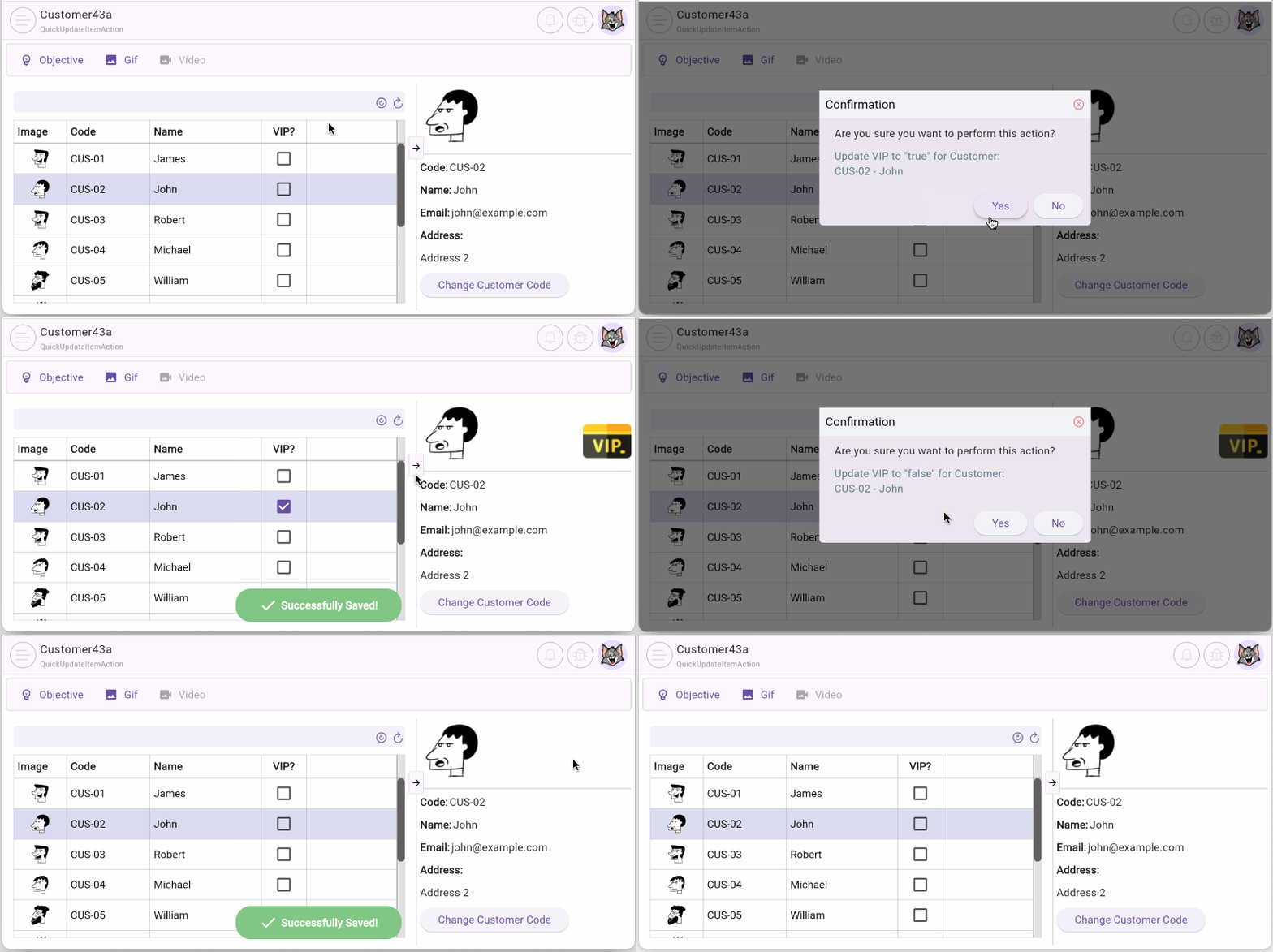
No ADS
Scenario 2 - Update Code via Dialog:
The user clicks a button to display a Dialog containing a TextField, then enters a "new customer code" for the current Customer, and finally clicks the "Change" button to update.
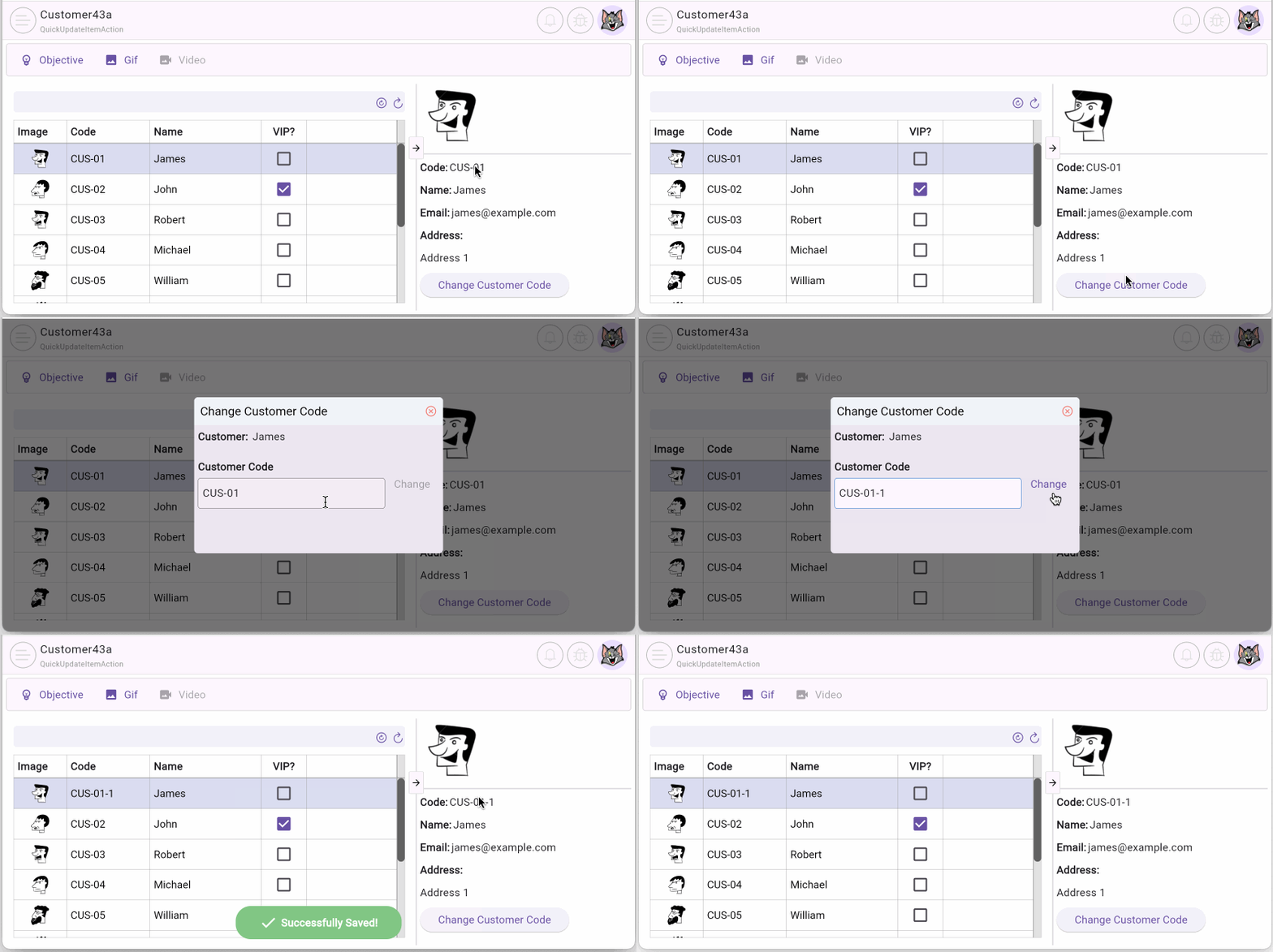
Note that this is not a traditional Form as you might be familiar with. It is simply a TextField placed on a Dialog to quickly gather information from the user, optimizing the data entry process.
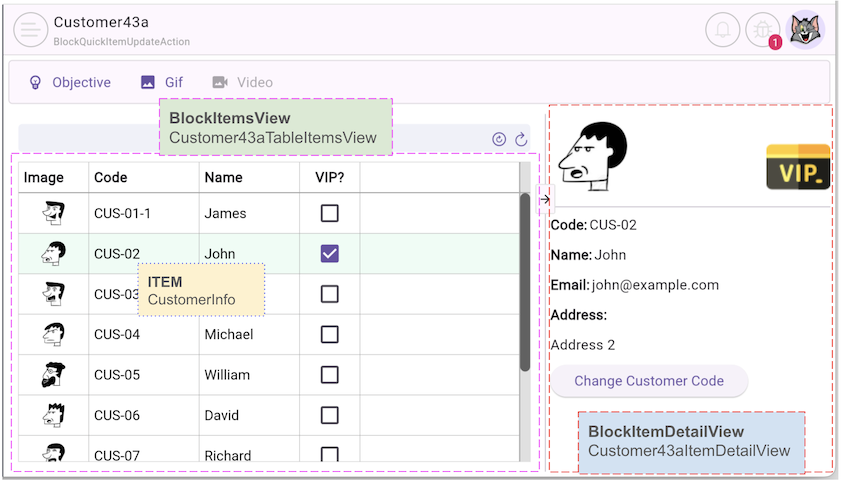
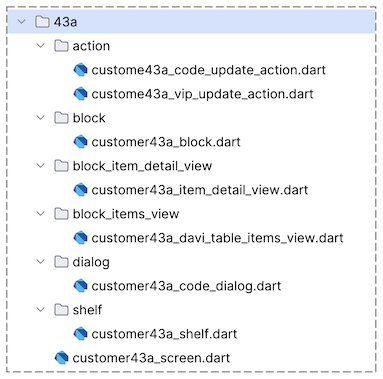
2. BlockQuickItemUpdateAction
First, we create the Customer43aVipUpdateAction class, extending the BlockQuickItemUpdateAction class to perform a quick VIP status update for a Customer:
customer43a_vip_update_action.dart
class Customer43aVipUpdateAction
    extends
        BlockQuickItemUpdateAction<
          int, //
          CustomerInfo,
          CustomerData,
          EmptyFilterCriteria
        > {
  final bool vip;

  final _customerRestProvider = CustomerRestProvider();

  Customer43aVipUpdateAction({
    required super.item,
    required super.config,
    required this.vip,
    required super.needToConfirm,
    required super.actionInfo,
  });

  @override
  Future<ApiResult<CustomerData>> performQuickUpdateItem({
    required Object? parentBlockItem,
    required EmptyFilterCriteria filterCriteria,
  }) async {
    return await _customerRestProvider.updateVip(customerId: item.id, vip: vip);
  }

  @override
  CustomConfirmation? createCustomConfirmation() {
    return null;
  }
}
Note: An object of the Customer43aVipUpdateAction class will be executed by the Customer43aBlock. Therefore, the corresponding Generics parameters with the same names in these two classes must be identical.
BlockQuickItemUpdateAction | Block |
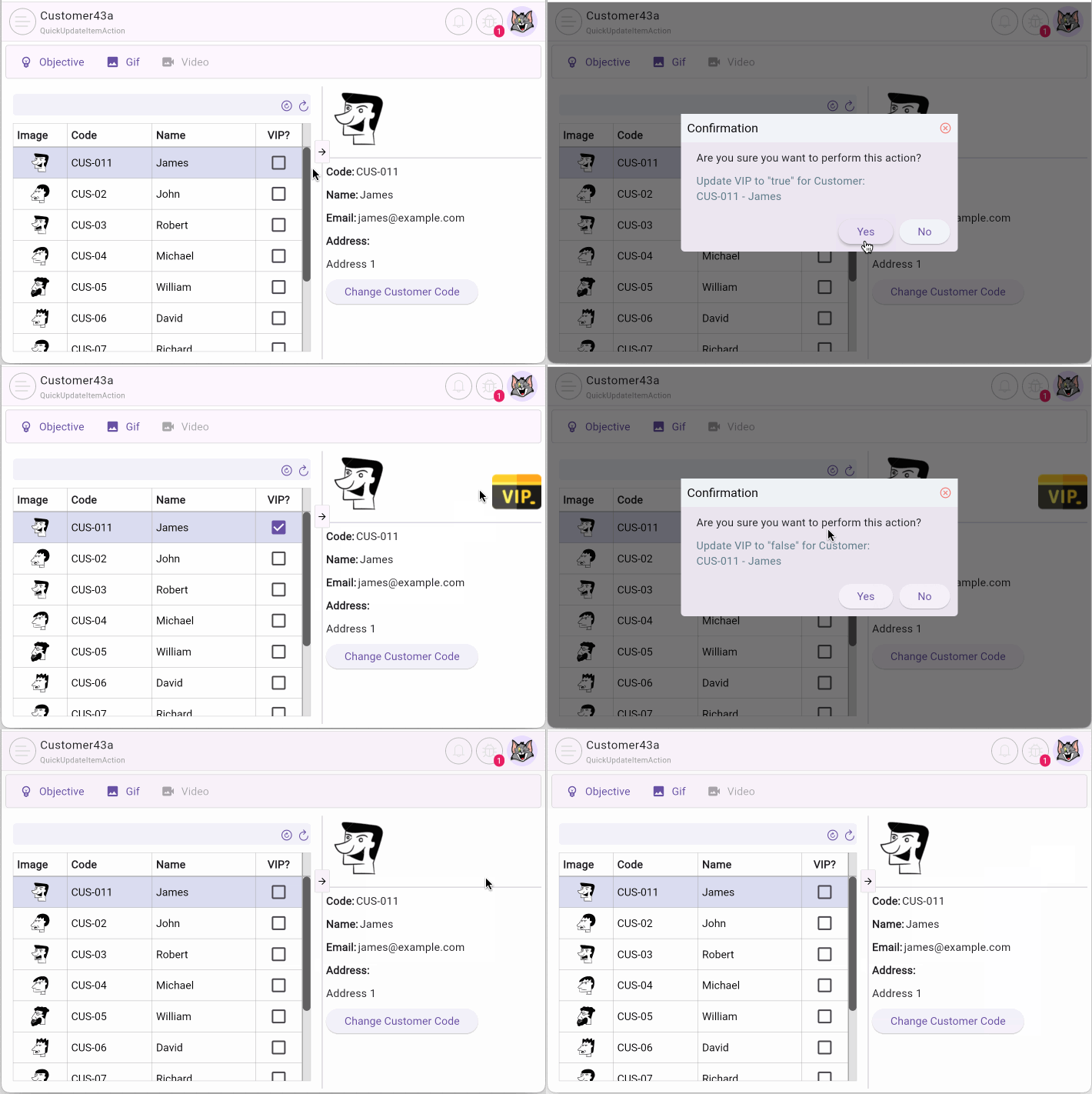
The _onChangedVip() method below is called when the user clicks the CheckBox. In this method, we create an instance of the Customer43aVipUpdateAction class and execute it via Customer43aBlock:
_onChangedVip()
Future<void> _onChangedVip({
  required CustomerInfo customerInfo,
  required bool vip,
}) async {
  // Debug:
  FlutterArtist.codeFlowLogger.addMethodCall(
    ownerClassInstance: this,
    currentStackTrace: StackTrace.current,
    parameters: {"customerInfo": customerInfo, "vip": vip},
  );
  //
  final updateAction = Customer43aVipUpdateAction(
    item: customerInfo,
    config: BlockQuickItemUpdateActionConfig(errorIfItemNotInTheBlock: true),
    vip: vip,
    needToConfirm: true,
    actionInfo:
        'Update VIP to "$vip" for Customer:\n'
        '${customerInfo.code} - ${customerInfo.name}',
  );
  // Customer43aBlock block:
  await block.executeQuickItemUpdateAction(action: updateAction);
}
Scenario 2:
In Scenario 2, we create the Customer43aCodeUpdateAction class to quickly update the Code for a Customer.
customer43a_code_update_action.dart
class Customer43aCodeUpdateAction
    extends
        BlockQuickItemUpdateAction<
          int, //
          CustomerInfo,
          CustomerData,
          EmptyFilterCriteria
        > {
  final String code;

  final _customerRestProvider = CustomerRestProvider();

  Customer43aCodeUpdateAction({
    required super.item,
    required super.config,
    required this.code,
    required super.needToConfirm,
    required super.actionInfo,
  });

  @override
  Future<ApiResult<CustomerData>> performQuickUpdateItem({
    required Object? parentBlockItem,
    required EmptyFilterCriteria filterCriteria,
  }) async {
    return await _customerRestProvider.updateCode(
      customerId: item.id,
      code: code,
    );
  }

  @override
  CustomConfirmation? createCustomConfirmation() {
    return null;
  }
}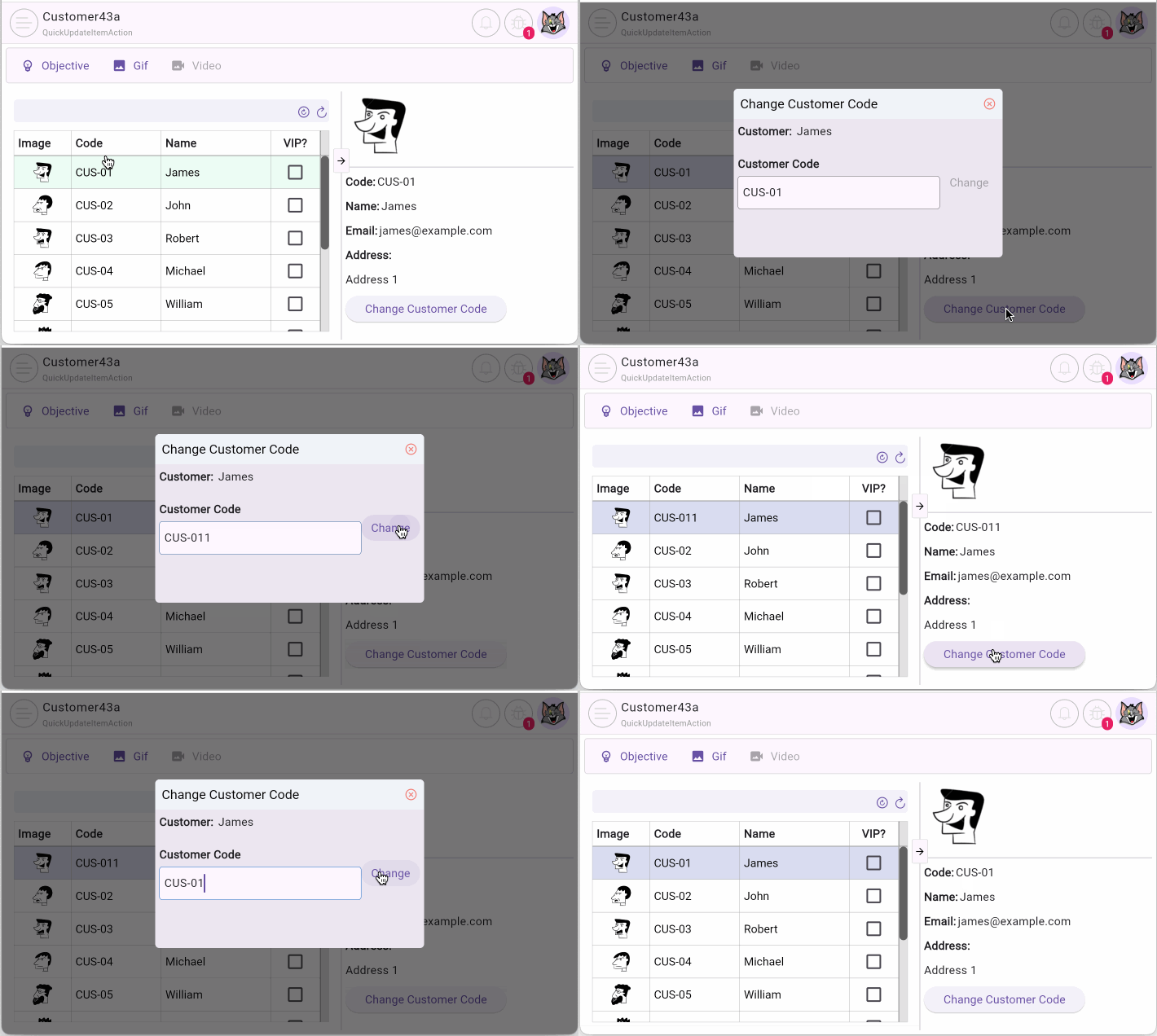
After the user enters a "new code" for the Customer in the Dialog and clicks the "Change" button, the _onPressedBtnUpdateCustomerCode() method is triggered. In this method, we instantiate the Customer43aCodeUpdateAction class (passing in the "new code") and execute it via Customer43aBlock:
_onPressedBtnUpdateCustomerCode()
Future<void> _onPressedBtnUpdateCustomerCode() async {
  FlutterArtist.codeFlowLogger.addMethodCall(
    ownerClassInstance: this,
    currentStackTrace: StackTrace.current,
    parameters: null,
  );
  //
  var updateAction = Customer43aCodeUpdateAction(
    item: widget.customer,
    config: BlockQuickItemUpdateActionConfig(errorIfItemNotInTheBlock: true),
    code: customerCode,
    needToConfirm: false,
    actionInfo: "Update code for Customer:\n${widget.customer.name}",
  );
  //
  BlockQuickItemUpdateResult result = await widget.customer43aBlock
      .executeQuickItemUpdateAction(action: updateAction);
  if (result.successForFirst && context.mounted) {
    Navigator.of(context).pop();
  }
}
No ADS
FlutterArtist
- FlutterArtist Debug Network Inspector
- Basic concepts in Flutter Artist
- FlutterArtist Block ex1
- FlutterArtist Filter Example
- FlutterArtist FilterModel MultiOptFilterCriterion ex1
- FlutterArtist FilterInput Example 1
- FlutterArtist Form ex1
- The idea of designing filter models in FlutterArtist
- FlutterArtist FormModel.patchFormFields() Ex1
- FlutterArtist BlockQuickItemUpdateAction Example
- FlutterArtist BlockNumberPagination Ex1
- FlutterArtist GridView Infinite Scroll Example
- FlutterArtist BlockQuickMultiItemCreationAction Example
- FlutterArtist ListView Infinite Scroll Pagination Example
- FlutterArtist Pagination
- FlutterArtist Sort DropdownSortPanel Example
- FlutterArtist Dio
- FlutterArtist BlockBackendAction Example
- FlutterArtist BackgroundWebDownloadAction Example
- FlutterArtist StorageBackendAction ex1
- FlutterArtist Block External Shelf Event Example
- FlutterArtist Filter FormBuilderMultiDropDown Ex1
- FlutterArtist Master-detail Blocks ex1
- FlutterArtist Scalar ex1
- FlutterArtist Pagination Davi table Infinite Scroll Ex1
- FlutterArtist Filter Tree FormBuilderField ex1
- FlutterArtist Filter FormBuilderRadioGroup ex1
- FlutterArtist Form Parent-child MultiOptFormProp ex1
- FlutterArtist Manual Sorting ReorderableGridView Example
- FlutterArtist Manual Sorting ReorderableListView
- FlutterArtist Scalar External Shelf Event Example
- FlutterArtist Code Flow Inspector
- FlutterArtist Projections
- FlutterArtist Debug Log Viewer
- FlutterArtist start
- FlutterArtist AppConfiguration
- FlutterArtist Debug App Inspector
- FlutterArtist Debug Filter Criteria Inspector
- FlutterArtist Debug Filter Model Inspector
- FlutterArtist Debug Form Model Inspector
- FlutterArtist DebugMenu
- FlutterArtist Debug UI Context Inspector
- FlutterArtist Debug Shelf Structure Inspector
- FlutterArtist Context Provider Views
- FlutterArtist FilterModelStructure ex1
- FlutterArtist FilterModelStructure ex2
- FlutterArtist FilterModelStructure ex3
- FlutterArtist Internal Shelf Event ex1
- FlutterArtist Deferring External Shelf Events Example
- FlutterArtist Face
- Overview of FlutterArtist Theme
- FlutterArtist Theme Design Tokens Architecture
- FlutterArtist Themes FaColorUtils
- Flutter Artist Theme - Create a custom theme
Show More